
Complete Canada Permanent Residence Process from AoR to CoPR
Published on 25-12-2025
Written by Medy Zeus

When you submit an application for Canadian Permanent Residence (PR), your file enters a structured IRCC process that involves multiple document checks, eligibility assessments, background verifications, and final approvals before you receive a Confirmation of Permanent Residence (CoPR) or an electronic CoPR (eCoPR) if you are already in Canada. Below is a clear explanation of each step with relevant regulatory references and definitions.
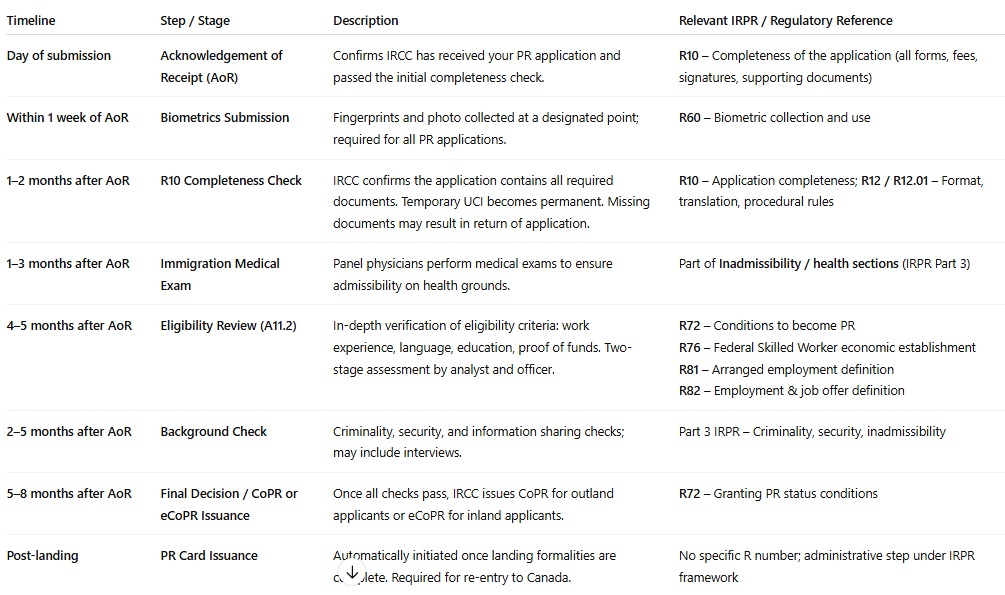
1. Submission and Acknowledgement of Receipt (AoR / R10)
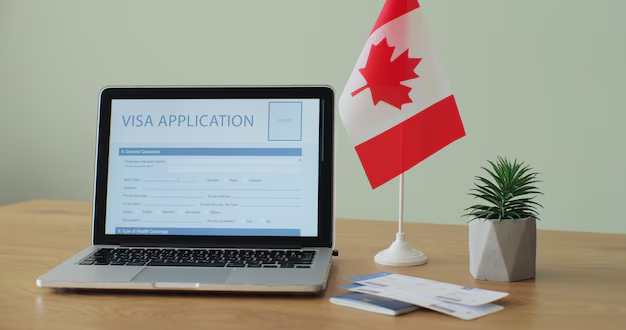
Acknowledgement of Receipt (AoR) is your first confirmation that IRCC has received your application and that it has passed the initial R10 Completeness Check under the Immigration and Refugee Protection Regulations (IRPR). This official R10 letter is generated after IRCC confirms your application package contains all required documentation according to current guidelines and checklist criteria. It is more authoritative than the electronic receipt shown immediately after submission.
Canada Immigration Services

The R10 Completeness Check is strictly about whether all required forms and documents are present. It does not assess whether you meet the eligibility criteria for the immigration category you applied under. Only once R10 is passed does the official processing time begin.
Canada Immigration Services
2. Biometrics Submission (Typically Within 1 Week of AoR)
After the AoR is issued, IRCC sends a Biometrics Instruction Letter to request that applicants aged 14–79 visit a collection point to provide fingerprints and a photo. These biometrics are used later for criminality, security, and information-sharing checks.
Biometrics are required every time you apply for permanent residence, even if you have previously submitted them on another application. They are updated quickly in the system once captured.
3. R10 and Application Integrity
Once the official R10 Completeness Check is completed, your temporary UCI (Unique Client Identifier) becomes permanent. This R10 letter can also help you demonstrate eligibility for a Bridging Open Work Permit (BOWP) if you are transitioning from temporary status in Canada.
Canada Immigration Services
If any required documents are missing, your application can be returned outright with fees refunded because it did not meet R10 requirements. This is why double‑checking your submission before filing is crucial.

4. Medical Examination (Typically Within 1–3 Months)
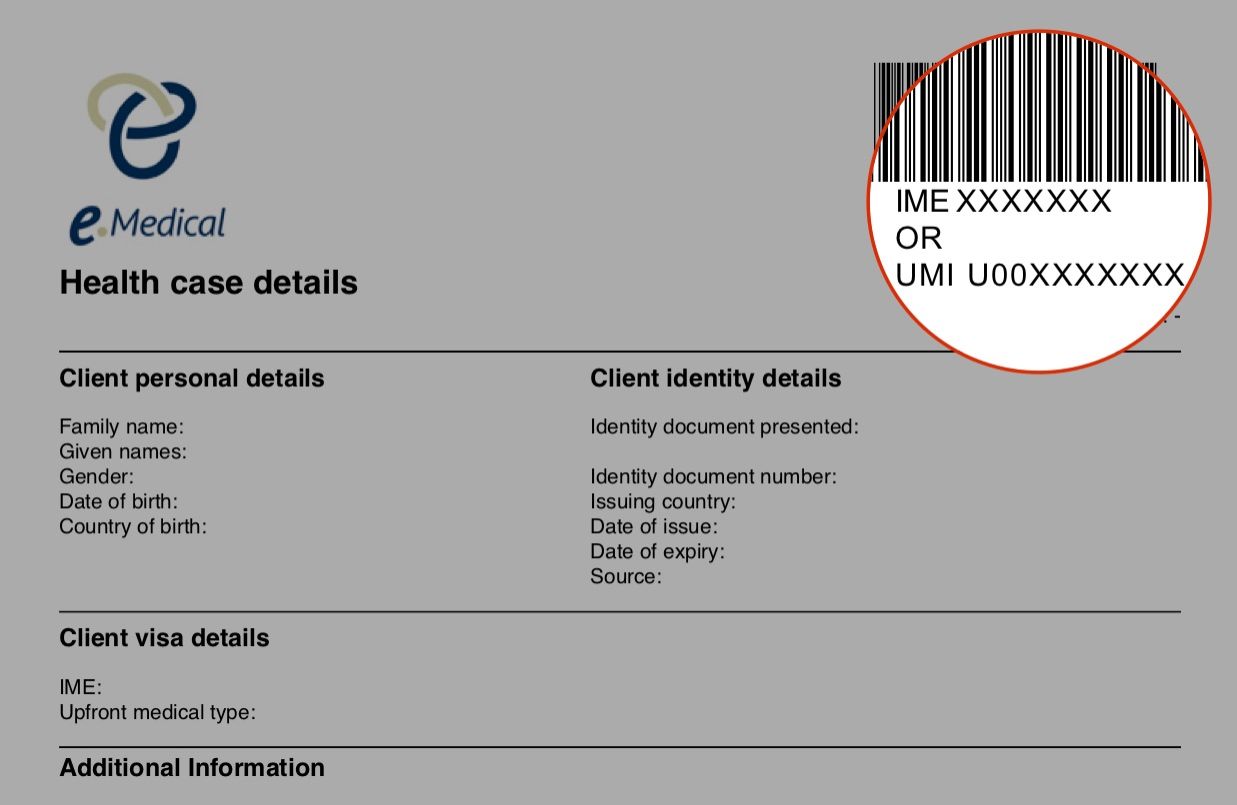
IRCC usually requests Immigration Medical Examinations once your application enters the deeper stages of processing (often concurrently with or soon after eligibility review starts). Only panel physicians accredited by IRCC can conduct this exam. Medical results must be valid up to and at the time of decision and landing.
5. Review of Eligibility (A11.2)
The eligibility review stage is identified in regulations as A11.2 (section 11.2 of the Immigration and Refugee Protection Act). This is where IRCC verifies whether you truly meet the program requirements under which you applied, including factors such as work experience, language ability, education, and proof of funds. This stage is more detailed and time‑intensive because officers check authenticity and relevance of all documents submitted.
A two‑stage assessment occurs:
-
Initial Assessment by an analyst or processing agent
-
Final Assessment and Decision by an immigration officer
IRCC may issue Additional Document Requests (ADR) at this stage if any clarification or extra evidence is needed.
6. Additional IRPR Regulations Referenced in PR Processing
While not all sections of the Immigration and Refugee Protection Regulations directly correspond to specific processing “steps,” several are implicitly part of the eligibility framework IRCC uses when evaluating applications. Many of these are referenced internally by officers and are important to understand:
R10 – Completeness of the Application
Ensures the application package includes everything required by law before substantive review begins, including forms, fees, signatures, supporting documentation, and identification of all family members.
Canada Immigration Services
R72 – Becoming a Permanent Resident
Outlines what must be established before someone becomes a permanent resident:
-
Submission of an application under the Regulations
-
Authorization to remain in Canada (if already in Canada)
-
Meeting the selection criteria for the applied class
-
Applicant and family members are not inadmissible
-
Valid medical certificate, unless exempted
Department of Justice Canada
This regulation is the ultimate legal basis for granting PR status. Eligibility review and all background checks must satisfy these points before IRCC can issue a CoPR.
R76 – Skilled Worker Economic Establishment Criteria
Provides specific criteria for evaluating a Federal Skilled Worker (FSW) applicant’s ability to become economically established in Canada. Officers use this during A11.2 review to confirm that work experience, language ability, education, and other factors meet the FSW criteria.
Department of Justice Canada
R81 – Arranged Employment Definition
Defines what constitutes arranged employment, which can affect PR streams and CRS points. Officers verify that any claimed job offer is genuine and meets IRPR requirements.
Department of Justice Canada
R82 – Definition of Employment and Job Offers
Closely related to R81, R82 regulates employment definitions used to award CRS points and determine eligibility.
Department of Justice Canada
Other Relevant IRPR Sections
-
R12 and 12.01 – General application requirements beyond R10 (e.g., format, translation, fees). Officers may cite these for procedural errors.
-
R60 and related biometric provisions – Regulate collection and use of biometric information.
-
Inadmissibility sections (Part 3 of IRPR) – Govern criminality, security, and health grounds for refusing a PR application.
These sections form the legal framework against which IRCC evaluates your application.
7. Background Check – Criminality, Information Sharing, Security Screening
After eligibility is established or concurrently, IRCC conducts extensive background checks, including:
-
Criminality checks (police certificates)
-
Information sharing with foreign governments or intelligence partners
-
Security screening (CBSA, CSIS)
These checks are essential for admissibility and must conclude before final approval.

8. Interviews and Additional Requests
In rare cases, IRCC may request an interview to verify information or for quality assurance. More common in family-sponsored applications, interviews can occur for any PR application if documents alone do not clarify eligibility.
9. Final Decision and Issuance of CoPR or eCoPR
Once all assessments, including eligibility, criminality, medicals, security, and information sharing, are complete:
-
Outland applicants receive a Confirmation of Permanent Residence (CoPR) and, if required, a visa.
-
Inland applicants already in Canada receive an eCoPR digitally.
CoPR validity cannot be extended; applicants must land in Canada before expiry.
10. Post‑Approval Steps: Landing and PR Card
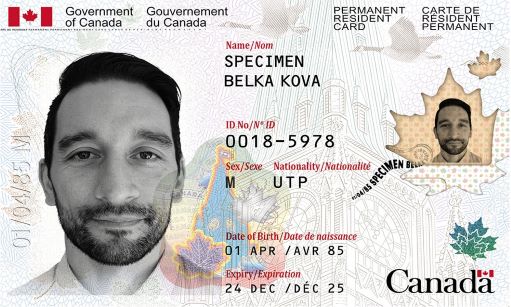
After landing in Canada, your PR status becomes effective. IRCC automatically initiates your first PR card application once your photo and Canadian address are confirmed in the PR portal. Outland applicants receive this request after landing at the border.
11. IRCC Terms You Should Know (From the IRCC Manual)
-
Acknowledgement of Receipt (R10 passed) – Confirms your application passed the completeness check; supports work permit applications if other criteria are met.
-
Arranged employment (R82) – Regulatory definition that can impact eligibility and CRS points.
-
Express Entry pool – Candidates meeting eligibility criteria, ranked for ITAs using CRS.
-
Applicant – Person who submitted a complete PR application.
These definitions help align your understanding with IRCC staff interpretations.
-
Education - 30-12-2025
Studying in Canada as a pathway to permanent residence
-
Canadian Immigration News - 31-12-2025
Bill C 12 and the future of immigration in Canada
-
Law - 01-01-2026
GCMS Notes and Why They Matter for Your Immigration Application
-
Travel - 03-01-2026
Required documents for a visitor visa to Canada 2026
-
Canadian Immigration News - 05-01-2026
First Express Entry Draw of 2026 Issues 574 PNP Invitations
Disclaimer:
MapleMind Canada provides administrative and informational support to help track your immigration process and organize your documents. The services do not constitute legal advice or representation before IRCC. The platform is independent, and the information provided is for educational purposes and may change.

Pay by CCP - GCMS Notes
To complete your order via CCP, please follow the steps below.
Keep your payment receipt, as it will be required to confirm your order.
Steps to follow:
- Go to Algeria Post office.
- Fill out a CCP transfer form with the following information:
- Beneficiary Account: 10781565 25
- Beneficiary Name: Mehdi NADIR
- Amount: 6,785 DZD 8,050 DZD
- Pay the amount at the counter and keep the receipt.
- Send a clear photo of the receipt to our email [email protected]
Your order will be validated as soon as we confirm your payment. You will receive an email informing you that your GCMS notes request has been submitted to IRCC.
Application Number (File Number)
Every application submitted to IRCC is assigned a unique number, also known as a file number. This identifier helps track your application and ensures it can be distinguished from others, even if you submit multiple requests.
An application number is usually made up of one or more letters followed by several digits (for example, E123456789). The letters at the beginning indicate the type of application.
Examples of application number prefixes:
- E123456789 – Economic application (commonly used for Express Entry)
- EP12345678 – Provincial Nominee Program (PNP)
- V123456789 – Visitor visa, Visitor record, or eTA
- F123456789 – Family sponsorship
- S123456789 – Study permit
- W123456789 – Work permit
- H123456789 – Humanitarian and Compassionate (H&C)
- RHB123456789 – Rehabilitation
- L123456789 – Refugee claims
- N123456789 – Removal orders
- G123456789 – Refugee resettlement
- C123456789 – Citizenship grant
- PR12345678 – Citizenship certificate
- D123456789 – Temporary Resident Permit
Consent Form
To request GCMS notes, you must complete and sign the consent form. This document authorizes the release of your personal information to a designated representative.
Please print the form and complete it using a BLUE PEN. Only fill in the sections highlighted in the example provided.
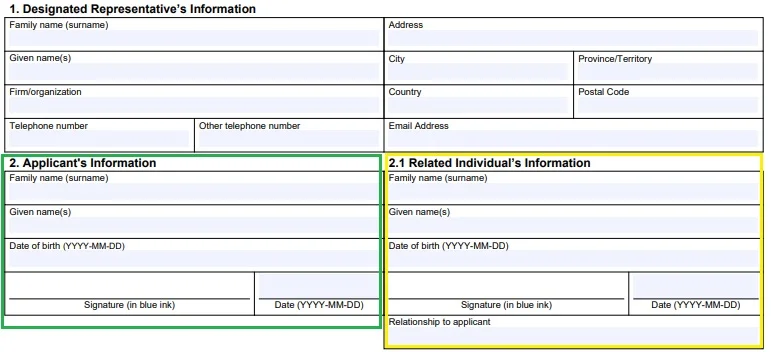
Only fill in the highlighted sections
If your application includes family members (spouse or dependents), each person must complete and sign their respective section of the form.
Make sure all information is accurate and matches your official documents before sending the form.
UCI (Unique Client Identifier)
The UCI, or Unique Client Identifier, is a personal reference number assigned by IRCC to each individual. It is used to identify and track a client across all their applications.
Each person receives a unique UCI, which remains the same for life. Even if you submit multiple applications to IRCC, your UCI does not change, although each application will have its own application number.
If you have previously applied to IRCC, you likely already have a UCI. When submitting a new application, the same UCI will continue to be used.
A UCI is made up of digits only and is typically either 8 or 10 digits long. It may appear with or without hyphens.
Common formats include: ####-#### or ##-####-####.
If you have recently applied, you may temporarily see a number such as CAN1234567. This is a provisional identifier that will later be replaced by your permanent UCI once your information is fully processed.
Pay by CCP - CBSA Notes
To obtain your CBSA notes, please follow the steps below.
Keep your payment receipt, as it will be required to confirm your order.
Steps to follow:
- Go to any Algeria Post office.
- Fill out a CCP transfer form with the following information:
- Beneficiary Account: 10781565 25
- Beneficiary Name: Mehdi NADIR
- Amount: 9,798 DZD 11,560 DZD
- Pay the amount at the counter and keep the receipt.
- Send a clear photo of the receipt to our email [email protected]
Your order will be validated once we have confirmed your payment. You will receive an email informing you that your CBSA notes request has been submitted to CBSA.
Pay by CCP - Easytef
The Easytef Pack is designed to help you prepare for the TEF exam. It includes access to our revision sheets, practice exercises, and expert tips to maximize your score.
To order this pack, follow the steps below and make the payment via CCP.
How to order:
- Go to the nearest post office or use your BaridiMob app.
- Make a CCP payment using the following details:
- CCP Number: 10781565 25
- Beneficiary Name: Mehdi NADIR
- Amount: 5,793 DZD 7,560 DZD
- Keep the receipt or take a screenshot of the transaction.
- Send us the payment proof to our email [email protected]
Once we receive and verify the payment, your access to the Easytef Pack will be activated and you will receive a confirmation message.
Pay by CCP – TCF Bronze Pack
The TCF Bronze Pack is perfect if you want to practice with basic exercises to prepare for your TCF exam. It includes essential review sheets and a few practice tests.
To order this pack, follow the steps below and make the payment via CCP.
How to order:
- Go to the nearest post office or use your BaridiMob app.
- Make a CCP payment using the following details:
- CCP Number: 10781565 25
- Beneficiary Name: Mehdi NADIR
- Amount: 7,053 DZD 8,315 DZD
- Keep the receipt or take a screenshot of the transaction.
- Send us the payment proof to our email [email protected]
Once we receive and verify your payment, your access to the TCF Bronze Pack will be activated and you will receive a confirmation message.
Pay by CCP – TCF Silver Pack
The TCF Silver Pack is ideal if you want a more complete training for the TCF. It includes all the revision sheets, multiple sets of practice exercises, and expert tips to help you progress faster.
To order this pack, follow the steps below and make the payment via CCP.
How to order:
- Go to the nearest post office or use your BaridiMob app.
- Make a CCP payment using the following details:
- CCP Number: 10781565 25
- Beneficiary Name: Mehdi NADIR
- Amount: 10,833 DZD 12,600 DZD
- Keep the receipt or take a screenshot of the transaction.
- Send us the payment proof to our email [email protected]
Once we receive and verify your payment, your access to the TCF Silver Pack will be activated and you will receive a confirmation message.
Pay by CCP – TCF Gold Pack
The TCF Gold Pack is the most complete option to prepare for the TCF. It includes access to all revision sheets, full sets of practice exercises, and multiple exam simulations to put yourself in real test conditions.
To order this pack, follow the steps below and make the payment via CCP.
How to order:
- Go to the nearest post office or use your BaridiMob app.
- Make a CCP payment using the following details:
- CCP Number: 10781565 25
- Beneficiary Name: Mehdi NADIR
- Amount: 16,380 DZD 18,900 DZD
- Keep the receipt or take a screenshot of the transaction.
- Send us the payment proof to our email [email protected]
Once we receive and verify your payment, your access to the TCF Gold Pack will be activated and you will receive a confirmation message.
Pay by CCP – Canadian Citizenship Test Prep
Our Canadian Citizenship Test Preparation program helps you study the Discover Canada guide effectively with practice questions, interactive quizzes, and full exam simulations.
To register for this program, follow the steps below and make the payment via CCP.
How to register:
- Go to the nearest post office or use your BaridiMob app.
- Make a CCP payment using the following details:
- CCP Number: 10781565 25
- Beneficiary Name: Mehdi NADIR
- Amount: 7,540 DZD 9,300 DZD
- Keep the receipt or take a screenshot of the transaction.
- Send us the payment proof to our email [email protected]
Once we receive and verify your payment, your access to the Citizenship Test Preparation will be activated and you will receive a confirmation message.
Tip through Baridimob
We would be very grateful for your support.
How to tip using Baridimob:
- If you have not downloaded Baridimob yet, you can get it from Google Play or the App Store. Once you have downloaded the app, follow these steps:
- Open the Baridimob app.
- If you are not signed in, log in with your username and password, then tap on "Continue"
- Tap on "Transfers".
- Tap on "Transfer to another CCP account".
- Fill out the form with the following information:
- RIP account: 00799999001078156564
- Amount: XX DZD (we know you're generous 😋)
- Tap on "Continue".
- Enter your password and tap "Continue".
- DONE! You have successfully tipped.
Once we receive and verify the payment, your access to the Easytef Pack will be activated and you will receive a confirmation message.
Privacy Policy
Read all Privacy PolicyThis Privacy Policy explains how MapleMindCanada collects, uses, stores, and discloses user information (hereinafter 'User(s)') of the website https://maplemindcanada.com ('Site'). This policy applies to all services and products offered by MapleMindCanada.
Personal Identification Information
We may collect personal information from Users in various ways, including when Users visit our Site, register, subscribe to our newsletter, fill out a form, or interact with the services and resources available on the Site. Collected information may include:
- Name
- Email address
- Information related to their immigration journey.
Users may visit the Site anonymously. We only collect personal information if it is voluntarily provided. However, some activities on the Site may require the provision of such information.
Non-Personal Information
We may collect non-personal information when Users interact with our Site. This may include browser type, operating system, Internet service provider, and other technical information related to User connections.
Cookies and Similar Technologies
Our Site may use cookies to enhance the User experience. These cookies help track Site usage without personally identifying Users. We use Google Analytics and Google Ads for analytical and advertising purposes.
Users can configure their browser to refuse cookies, but some Site functionalities may be affected.
Upon their first visit, Users will have the option to accept or decline the use of cookies.
Use of Collected Information
MapleMindCanada collects and uses User information to:
- Improve customer service,
- Personalize the user experience and adapt available resources,
- Enhance the Site based on user feedback,
- Send informational or promotional emails to Users who have consented to receive them.
Users can unsubscribe at any time via the unsubscribe link in our emails.
Information Protection
We implement security measures to protect personal information against unauthorized access, alteration, disclosure, or destruction.
Sharing of Personal Information
We do not sell, trade, or rent Users’ personal information to third parties. However, we may share aggregated demographic information with our trusted partners for analytical purposes.
Deletion of Personal Information
Users can delete their personal data from their account. Deleting data will result in automatic unsubscribing from our communications.
Third-Party Websites
Our Site may contain links to third-party websites. We are not responsible for their privacy practices and encourage Users to review their respective policies.
Advertising
Ads displayed on our Site may use cookies to target advertising based on User preferences.
GDPR Compliance
MapleMindCanada complies with the General Data Protection Regulation (GDPR). We ensure:
- Appointment of a Data Protection Officer,
- Transparency in collected information,
- Full control for Users over their personal data,
- Interactions only with Users who have explicitly consented.
Privacy Policy Changes
MapleMindCanada may update this policy at any time. The update date will be indicated at the bottom of this page. Users are encouraged to check this page regularly.
Acceptance of Terms and Conditions
By using this Site, you agree to this Privacy Policy. If you do not agree, please do not use our Site. Continued use after policy modifications constitutes acceptance of the changes.
Contact Us
If you have any questions regarding this Privacy Policy, you can contact us via our contact form at https://maplemindcanada.com/contact
Terms and Conditions
Read all Terms and ConditionsPlease read these Terms of Service ("Agreement", "Terms of Service") carefully before using maplemindcanada.com ("the Site") operated by MapleMindCanada ("us", "we", or "our"). This Agreement sets forth the legally binding terms and conditions for your use of the Site at maplemindcanada.com. By accessing or using the Site in any manner, including but not limited to visiting or browsing the Site or contributing content or other materials, you agree to be bound by these Terms of Service. Capitalized terms are defined in this Agreement.
Intellectual Property
The Site and its original content, features, and functionality are owned by MapleMindCanada and are protected by international copyright, trademark, patent, trade secret, and other intellectual property or proprietary rights laws.
Termination
We may terminate your access to the Site, without cause or notice, which may result in the forfeiture and destruction of all information associated with you. All provisions of this Agreement that by their nature should survive termination shall survive termination, including, without limitation, ownership provisions, warranty disclaimers, indemnity, and limitations of liability.
Links to Other Sites
Our Site may contain links to third-party websites that are not owned or controlled by MapleMindCanada.MapleMindCanada has no control over, and assumes no responsibility for, the content, privacy policies, or practices of any third-party websites or services. We strongly advise you to read the terms and conditions and privacy policies of any third-party site you visit.
Governing Law
This Agreement (and any further rules, policies, or guidelines incorporated by reference) shall be governed and construed in accordance with the laws of [jurisdiction], without giving effect to any principles of conflicts of law.
Changes to This Agreement
We reserve the right, at our sole discretion, to modify or replace these Terms of Service by posting the updated terms on the Site. Your continued use of the Site after any such changes constitutes your acceptance of the new Terms of Service.
Please review this Agreement periodically for changes. If you do not agree to this Agreement or any modifications to this Agreement, you must stop using the Site immediately.
Pay by CCP - GCMS Notes
To complete your order via CCP, please follow the steps below.
Keep your payment receipt, as it will be required to confirm your order.
Steps to follow:
- Go to Algeria Post office.
- Fill out a CCP transfer form with the following information:
- Beneficiary Account: 10781565 25
- Beneficiary Name: Mehdi NADIR
- Amount: 6,785 DZD 8,050 DZD
- Pay the amount at the counter and keep the receipt.
- Send a clear photo of the receipt to our email [email protected]
Your order will be validated as soon as we confirm your payment. You will receive an email informing you that your GCMS notes request has been submitted to IRCC.
Application Number (File Number)
Every application submitted to IRCC is assigned a unique number, also known as a file number. This identifier helps track your application and ensures it can be distinguished from others, even if you submit multiple requests.
An application number is usually made up of one or more letters followed by several digits (for example, E123456789). The letters at the beginning indicate the type of application.
Examples of application number prefixes:
- E123456789 – Economic application (commonly used for Express Entry)
- EP12345678 – Provincial Nominee Program (PNP)
- V123456789 – Visitor visa, Visitor record, or eTA
- F123456789 – Family sponsorship
- S123456789 – Study permit
- W123456789 – Work permit
- H123456789 – Humanitarian and Compassionate (H&C)
- RHB123456789 – Rehabilitation
- L123456789 – Refugee claims
- N123456789 – Removal orders
- G123456789 – Refugee resettlement
- C123456789 – Citizenship grant
- PR12345678 – Citizenship certificate
- D123456789 – Temporary Resident Permit
Consent Form
To request GCMS notes, you must complete and sign the consent form. This document authorizes the release of your personal information to a designated representative.
Please print the form and complete it using a BLUE PEN. Only fill in the sections highlighted in the example provided.
Only fill in the highlighted sections
If your application includes family members (spouse or dependents), each person must complete and sign their respective section of the form.
Make sure all information is accurate and matches your official documents before sending the form.
UCI (Unique Client Identifier)
The UCI, or Unique Client Identifier, is a personal reference number assigned by IRCC to each individual. It is used to identify and track a client across all their applications.
Each person receives a unique UCI, which remains the same for life. Even if you submit multiple applications to IRCC, your UCI does not change, although each application will have its own application number.
If you have previously applied to IRCC, you likely already have a UCI. When submitting a new application, the same UCI will continue to be used.
A UCI is made up of digits only and is typically either 8 or 10 digits long. It may appear with or without hyphens.
Common formats include: ####-#### or ##-####-####.
If you have recently applied, you may temporarily see a number such as CAN1234567. This is a provisional identifier that will later be replaced by your permanent UCI once your information is fully processed.
Pay by CCP - CBSA Notes
To obtain your CBSA notes, please follow the steps below.
Keep your payment receipt, as it will be required to confirm your order.
Steps to follow:
- Go to any Algeria Post office.
- Fill out a CCP transfer form with the following information:
- Beneficiary Account: 10781565 25
- Beneficiary Name: Mehdi NADIR
- Amount: 9,798 DZD 11,560 DZD
- Pay the amount at the counter and keep the receipt.
- Send a clear photo of the receipt to our email [email protected]
Your order will be validated once we have confirmed your payment. You will receive an email informing you that your CBSA notes request has been submitted to CBSA.
Pay by CCP - Easytef
The Easytef Pack is designed to help you prepare for the TEF exam. It includes access to our revision sheets, practice exercises, and expert tips to maximize your score.
To order this pack, follow the steps below and make the payment via CCP.
How to order:
- Go to the nearest post office or use your BaridiMob app.
- Make a CCP payment using the following details:
- CCP Number: 10781565 25
- Beneficiary Name: Mehdi NADIR
- Amount: 5,793 DZD 7,560 DZD
- Keep the receipt or take a screenshot of the transaction.
- Send us the payment proof to our email [email protected]
Once we receive and verify the payment, your access to the Easytef Pack will be activated and you will receive a confirmation message.
Pay by CCP – TCF Bronze Pack
The TCF Bronze Pack is perfect if you want to practice with basic exercises to prepare for your TCF exam. It includes essential review sheets and a few practice tests.
To order this pack, follow the steps below and make the payment via CCP.
How to order:
- Go to the nearest post office or use your BaridiMob app.
- Make a CCP payment using the following details:
- CCP Number: 10781565 25
- Beneficiary Name: Mehdi NADIR
- Amount: 7,053 DZD 8,315 DZD
- Keep the receipt or take a screenshot of the transaction.
- Send us the payment proof to our email [email protected]
Once we receive and verify your payment, your access to the TCF Bronze Pack will be activated and you will receive a confirmation message.
Pay by CCP – TCF Silver Pack
The TCF Silver Pack is ideal if you want a more complete training for the TCF. It includes all the revision sheets, multiple sets of practice exercises, and expert tips to help you progress faster.
To order this pack, follow the steps below and make the payment via CCP.
How to order:
- Go to the nearest post office or use your BaridiMob app.
- Make a CCP payment using the following details:
- CCP Number: 10781565 25
- Beneficiary Name: Mehdi NADIR
- Amount: 10,833 DZD 12,600 DZD
- Keep the receipt or take a screenshot of the transaction.
- Send us the payment proof to our email [email protected]
Once we receive and verify your payment, your access to the TCF Silver Pack will be activated and you will receive a confirmation message.
Pay by CCP – TCF Gold Pack
The TCF Gold Pack is the most complete option to prepare for the TCF. It includes access to all revision sheets, full sets of practice exercises, and multiple exam simulations to put yourself in real test conditions.
To order this pack, follow the steps below and make the payment via CCP.
How to order:
- Go to the nearest post office or use your BaridiMob app.
- Make a CCP payment using the following details:
- CCP Number: 10781565 25
- Beneficiary Name: Mehdi NADIR
- Amount: 16,380 DZD 18,900 DZD
- Keep the receipt or take a screenshot of the transaction.
- Send us the payment proof to our email [email protected]
Once we receive and verify your payment, your access to the TCF Gold Pack will be activated and you will receive a confirmation message.
Pay by CCP – Canadian Citizenship Test Prep
Our Canadian Citizenship Test Preparation program helps you study the Discover Canada guide effectively with practice questions, interactive quizzes, and full exam simulations.
To register for this program, follow the steps below and make the payment via CCP.
How to register:
- Go to the nearest post office or use your BaridiMob app.
- Make a CCP payment using the following details:
- CCP Number: 10781565 25
- Beneficiary Name: Mehdi NADIR
- Amount: 7,540 DZD 9,300 DZD
- Keep the receipt or take a screenshot of the transaction.
- Send us the payment proof to our email [email protected]
Once we receive and verify your payment, your access to the Citizenship Test Preparation will be activated and you will receive a confirmation message.
Tip through Baridimob
We would be very grateful for your support.
How to tip using Baridimob:
- If you have not downloaded Baridimob yet, you can get it from Google Play or the App Store. Once you have downloaded the app, follow these steps:
- Open the Baridimob app.
- If you are not signed in, log in with your username and password, then tap on "Continue"
- Tap on "Transfers".
- Tap on "Transfer to another CCP account".
- Fill out the form with the following information:
- RIP account: 00799999001078156564
- Amount: XX DZD (we know you're generous 😋)
- Tap on "Continue".
- Enter your password and tap "Continue".
- DONE! You have successfully tipped.
Once we receive and verify the payment, your access to the Easytef Pack will be activated and you will receive a confirmation message.
Privacy Policy
Read all Privacy PolicyThis Privacy Policy explains how MapleMindCanada collects, uses, stores, and discloses user information (hereinafter 'User(s)') of the website https://maplemindcanada.com ('Site'). This policy applies to all services and products offered by MapleMindCanada.
Personal Identification Information
We may collect personal information from Users in various ways, including when Users visit our Site, register, subscribe to our newsletter, fill out a form, or interact with the services and resources available on the Site. Collected information may include:
- Name
- Email address
- Information related to their immigration journey.
Users may visit the Site anonymously. We only collect personal information if it is voluntarily provided. However, some activities on the Site may require the provision of such information.
Non-Personal Information
We may collect non-personal information when Users interact with our Site. This may include browser type, operating system, Internet service provider, and other technical information related to User connections.
Cookies and Similar Technologies
Our Site may use cookies to enhance the User experience. These cookies help track Site usage without personally identifying Users. We use Google Analytics and Google Ads for analytical and advertising purposes.
Users can configure their browser to refuse cookies, but some Site functionalities may be affected.
Upon their first visit, Users will have the option to accept or decline the use of cookies.
Use of Collected Information
MapleMindCanada collects and uses User information to:
- Improve customer service,
- Personalize the user experience and adapt available resources,
- Enhance the Site based on user feedback,
- Send informational or promotional emails to Users who have consented to receive them.
Users can unsubscribe at any time via the unsubscribe link in our emails.
Information Protection
We implement security measures to protect personal information against unauthorized access, alteration, disclosure, or destruction.
Sharing of Personal Information
We do not sell, trade, or rent Users’ personal information to third parties. However, we may share aggregated demographic information with our trusted partners for analytical purposes.
Deletion of Personal Information
Users can delete their personal data from their account. Deleting data will result in automatic unsubscribing from our communications.
Third-Party Websites
Our Site may contain links to third-party websites. We are not responsible for their privacy practices and encourage Users to review their respective policies.
Advertising
Ads displayed on our Site may use cookies to target advertising based on User preferences.
GDPR Compliance
MapleMindCanada complies with the General Data Protection Regulation (GDPR). We ensure:
- Appointment of a Data Protection Officer,
- Transparency in collected information,
- Full control for Users over their personal data,
- Interactions only with Users who have explicitly consented.
Privacy Policy Changes
MapleMindCanada may update this policy at any time. The update date will be indicated at the bottom of this page. Users are encouraged to check this page regularly.
Acceptance of Terms and Conditions
By using this Site, you agree to this Privacy Policy. If you do not agree, please do not use our Site. Continued use after policy modifications constitutes acceptance of the changes.
Contact Us
If you have any questions regarding this Privacy Policy, you can contact us via our contact form at https://maplemindcanada.com/contact
Terms and Conditions
Read all Terms and ConditionsPlease read these Terms of Service ("Agreement", "Terms of Service") carefully before using maplemindcanada.com ("the Site") operated by MapleMindCanada ("us", "we", or "our"). This Agreement sets forth the legally binding terms and conditions for your use of the Site at maplemindcanada.com. By accessing or using the Site in any manner, including but not limited to visiting or browsing the Site or contributing content or other materials, you agree to be bound by these Terms of Service. Capitalized terms are defined in this Agreement.
Intellectual Property
The Site and its original content, features, and functionality are owned by MapleMindCanada and are protected by international copyright, trademark, patent, trade secret, and other intellectual property or proprietary rights laws.
Termination
We may terminate your access to the Site, without cause or notice, which may result in the forfeiture and destruction of all information associated with you. All provisions of this Agreement that by their nature should survive termination shall survive termination, including, without limitation, ownership provisions, warranty disclaimers, indemnity, and limitations of liability.
Links to Other Sites
Our Site may contain links to third-party websites that are not owned or controlled by MapleMindCanada.MapleMindCanada has no control over, and assumes no responsibility for, the content, privacy policies, or practices of any third-party websites or services. We strongly advise you to read the terms and conditions and privacy policies of any third-party site you visit.
Governing Law
This Agreement (and any further rules, policies, or guidelines incorporated by reference) shall be governed and construed in accordance with the laws of [jurisdiction], without giving effect to any principles of conflicts of law.
Changes to This Agreement
We reserve the right, at our sole discretion, to modify or replace these Terms of Service by posting the updated terms on the Site. Your continued use of the Site after any such changes constitutes your acceptance of the new Terms of Service.
Please review this Agreement periodically for changes. If you do not agree to this Agreement or any modifications to this Agreement, you must stop using the Site immediately.